
Join Iken Labs
Shape the Future of Iken Connect
Be part of our collaborative, client-led innovation programme — and get access to the latest Connect developments.
Ready to help build what’s next?
After submitting, you’ll receive a email with our short participant survey — this helps us understand your priorities and match you to the right opportunities.
What is Iken Labs?
A collaborative, client-led innovation programme
Iken Labs is our collaborative research and innovation hub, where clients like you help shape the future of our legal technology. By joining, you’ll work directly with our product team to test new features, share feedback, and guide what we build next.
When you sign up for Iken Labs, you’ll also unlock access opportunities for Iken Connect's development .




Your Questions Answered
Top questions from the webinar
📽️ Missed the webinar? Catch up here
Can Iken Connect users access the system without Iken licences?
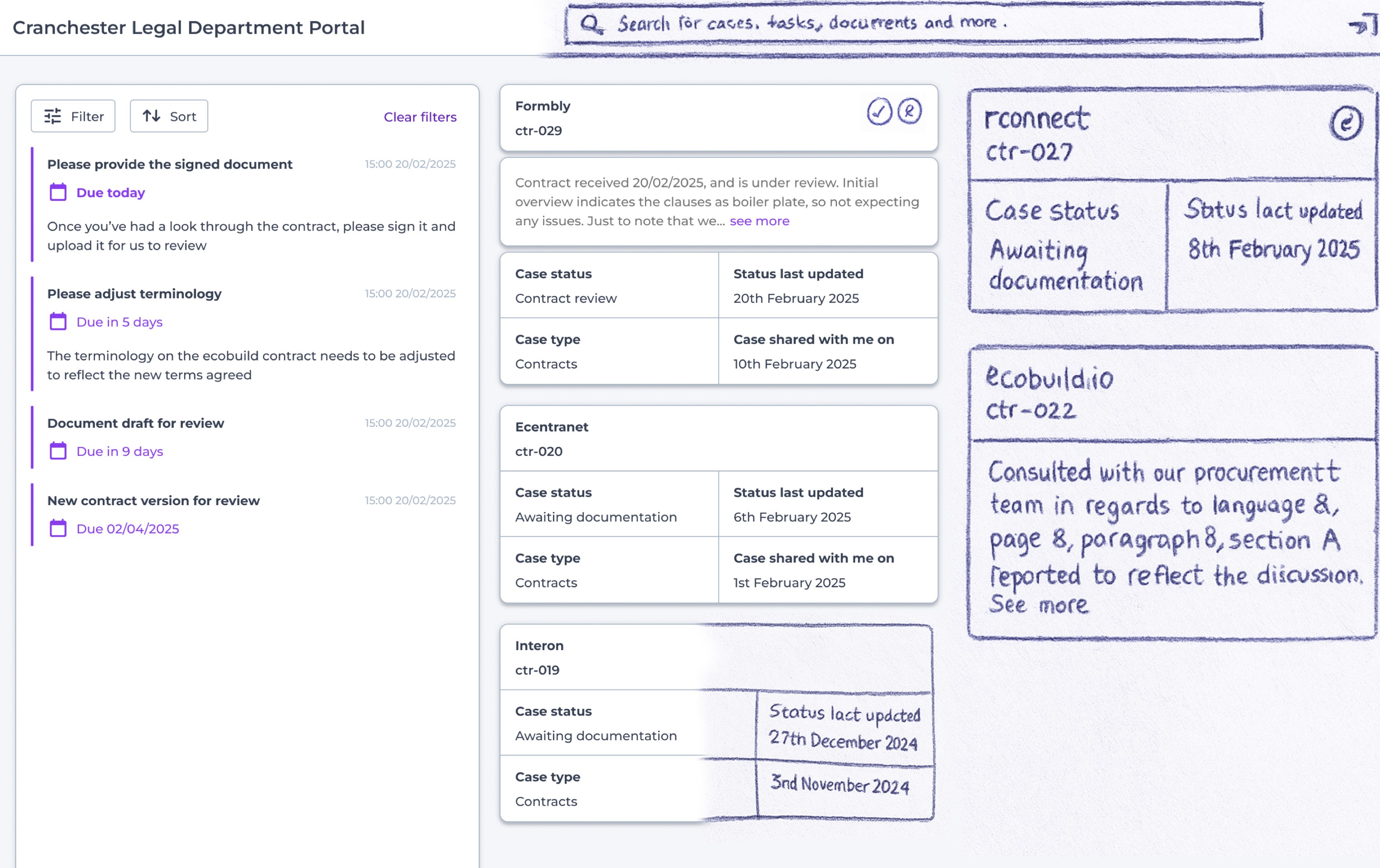
Yes: Iken Connect’s portal is designed to enable you as users of Iken to share information with Connect users without them requiring licences, and thus access to Iken directly. You’ll be able to share as many cases with as many people as you require.
Will Connect users be able to edit and collaborate on shared documents?
Yes: collaborative document editing is planned for a future version. Seamless integration with SharePoint and Google Drive is being explored to enable direct document collaboration without extra system logins.
Does the signing of documents work like DocuSign: with multiple signatories, witnesses, etc.?
Signing will use existing solutions like DocuSign. Signing workflows will rely on your existing e-signature systems for tracking and sealing, rather than Connect doing it directly we are exploring how to make this process smoother.
Will there be an audit log of who accessed Connect and when?
Yes: Connect will track user activity and logins, similar to the current Iken system. An event timeline audit trail is going to be developed and will show how a case progresses and who did what.
Will it be possible to see a snapshot of all tasks and statuses for a Connect client?
Yes: tasks assigned to a person will appear in the Matter’s Diary tab. The main Diary landing page will show all tasks and statuses across cases, plus reports and dashboards will cover this too.
Do Connect users need to sign in again for each notification?
Single sign-on behaviour depends on how your organisation’s system, or the external persons, is configured. If the SSO configuration allows session persistence, users won’t have to log in repeatedly during the day.
What is the timeline for the ‘Case Inception’ feature?
The aim is a Spring launch, with pilot testing and improvements through Autumn and Winter.
Will you be able to limit what internal or external recipients can do with a document?
Connect works by securely showing documents rather than emailing them. There are no strict controls yet for blocking download/printing but granular controls could be explored if there’s demand. When live collaboration is added, read-only modes for Connect users will be possible.
Will clients be able to submit case instructions directly in Connect?
For now, cases are created in Iken as normal and can then be shared via Connect. When the ‘Case Instruction’ system is built, portal users will be able to submit details directly and the system will create the case automatically, reducing manual entry.
